Iteration 2: Spec and Deliverables
Iteration 2: Choose a feature that uses an external API
In the following parts, ensure you are writing tests and bringing coverage for ActionMap to at least 75% (across the app/ directory).
Iteration 2, Part 1—Add an Issues column to News Articles
The Representatives table is currently associated with many news articles. What we’d like you to do in this section is add a new "Issue" column to News Articles to make it more specific.
TASK 2.1: Add an Issues attribute to news articles. An article’s issue can be selected when the article is created.
For a news article, add an ‘Issue’ column to News Articles to relate an article with a particular issue.
This field should be populated by a dropdown on the ‘Create News Article’ page, to associate an issue with a particular article. It should be drawn from the following list:
["Free Speech", "Immigration", "Terrorism", "Social Security and
Medicare", "Abortion", "Student Loans", "Gun Control", "Unemployment",
"Climate Change", "Homelessness", "Racism", "Tax Reform", "Net
Neutrality", "Religious Freedom", "Border Security", "Minimum Wage",
"Equal Pay"]
Iteration 2, Part 2
This part of the project comes with a choice: whether you’d like to augment the Representatives portion of the app, or the News Articles portion. In either case, you’ll be selecting an external API to use.
Secrets management will play an important role here (similar to how we set up the Google Civic Information API), whichever option you end up choosing, as will stubbing out and testing external APIs. Refer to the earlier Representatives section for a resource on stubbing out the internet.
Option 1: News API
Your second option for this task is to use the News API to pre-populate a list of news articles that the user can choose from to rate for a particular representative. News API is a site that provides a “front end” API to various news sources on the Web.
Here is the Google feed for News API.
- TASK 2.2: Currently, the new news article page (
/representatives/[id]/my_news_item/new) has fields for Title, Link, Description, Representative, and Issue. Split this into two pages, where a user can first select the Representative and Issue they desire, and clickSearch. - TASK 2.3: This should take them to a second page, where there is a list of the top 5 articles returned from the News API, and they can select one via radio button. This list of articles comes from making a query to the News API, and getting the top 5 titles, URLs, and descriptions.
- TASK 2.4: A user should be able to select a radio button for their desired article, rate it, and hit the
Savebutton to add it to the database. - TASK 2.5: See below for a lo-fi mockup. Text in
blueis user input, and inredare notes.
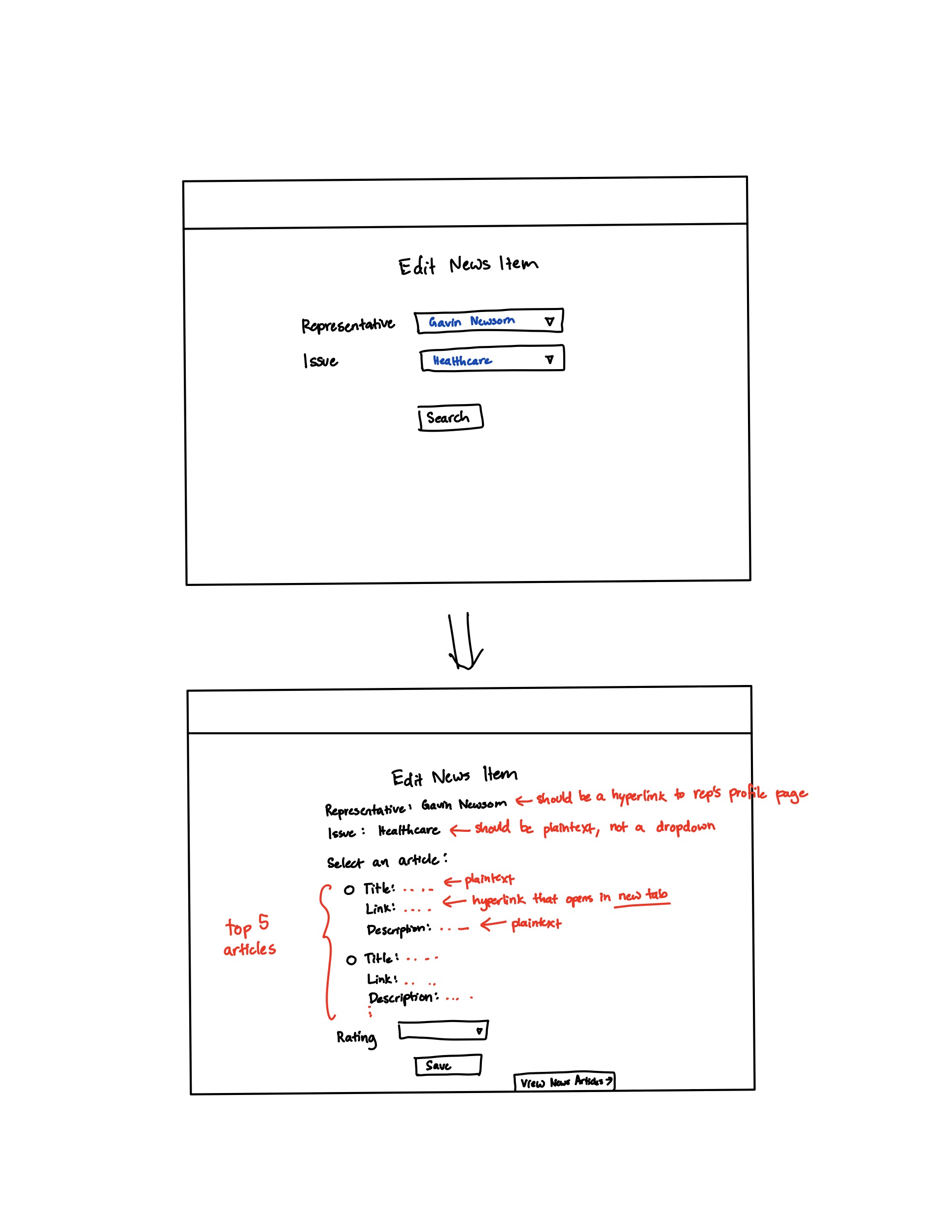
Option 2: Congress.gov API
In this task you will explore adding an functionality to search congress.gov for various bills. Take a look at api.congress.giv and lib/congress-api.rb. There is a very helpful GitHub repository for the API.
Before you begin, you’ll need to sign up for an API key. Save the credentials in your app as CONGRESS_GOV_API_KEY. (Review iteration 1.)
- TASK 2.2: Scaffold a model, view, and controller for a
bill. A bill should have the following attributes:title(a string)congress(an integer, currently 118)number(an integer)original_chamber(house or senate)type(text, see the API documentation for the available bill types)summary(text)- Consider using
rails generate’s built-in tools to help speed up this process.
- TASK 2.3: The base route should be
/billsand you should add a link to the navbar called “Bills” which takes the user to the bills index page. - TASK 2.4: The bills index page should allow a user to search the congress.gov API for bills. A user should be able to search based on
congress, andbill type.- If a user provides no search parameters, the search should return the 50 most recent bills.
- If a user wants to search by bill type, they will be required to provide the congress session number. The user should be able to select from a dropdown of valid types. (See the API documentation for the available bill types)
- TASK 2.5: Display the search results as a table.
- Outside the table show the number of results shown and the total number of results returned by the API.
- The columns should be: “#”, title, congress, type, Chamber, and “Last Action”
- Format the “#” number column such that the number and chamber are displayed as “HR 123” or “SR 999”, where the first text is a shorthand version of the bill type.
- Format the “Last Action” column such that it has the text of the last action followed by “on Mon, dd, YYYY”, e.g.
Became Public Law No: 117-108 on Apr 6, 2024 - Add a last column with a button called “Save”
- TASK 2.6: Save the bill with a summary.
- Add a button to save the bill to the database.
- When saving a bill to the database, you should also extract the bill summary from the congress.gov API.
- A successful save should redirect the user to the “show” page for that given bill.
- The show page should display all the info you’ve saved, but the design is up to you.
Getting Started with the API
We have provided a very simple wrapper for the congress.gov API inside lib/congress-api.rb
To get started using the API we need to do a few things:
- Add
gem 'faraday_middleware'to the Gemfile and reinstall all dependencies. - Create a space to call the API, in that file you will need to use
require_relative '../lib/congress-api'- Note: You’ll need to make sure this base is correctly updated relative to whatever file you are using.
- Typically you include this line right at the top, outside of an
classdefinitions.
- Call and test the API:
API_KEY = ENV.fetch("CONGRESS_GOV_API_KEY", Rails.application.credentials.congress_gov_api_key)
client = Congress::API.new(API_KEY)
client.get('/bills')
client.get('/bills', { limit: 100 })
The API we’ve provided returns JSON results, but it’s by no means complete. Feel free to adapt the file as needed.
Iteration 2, Part 3—Improve Accessibility Testing
Add accessibility tests for at least two different routes, or two substantially different views of the same route. For this iteration, these should be routes that you have added modified during part of this iteration.
- Open
features/accessibility.featureand add scenarios for two critical user paths. For example:
Scenario: State map page is accessible
  Given I am on the state map page for "CA"
  Then the page should be axe clean
You may pick any two routes you wish. In iteration 2, you’ll need to add an additional 2 routes to this file. (These tests will also help contribute to your overall test coverage.)
When we run the step Then the page should be axe clean, we audit the HTML of whatever is currently in view in the browser. In this case, consider what happens if expand (or hide) the counties table on the state page. You might get different results!
- Run the accessibility tests:
bundle exec cucumber -p a11y
- Fix any violations reported by axe. Common issues include:
- Missing form labels
- Images without alt text
- Insufficient color contrast
- Missing page landmarks
Additional Resources and References
If you’d like to more easily test accessibility during development, consider using the following tools and references:
- axe DevTools Chrome Extension - This will run the same axe accessibility tests directly in your browser, and you can use it while developing. Simply install the extension, open the DevTools panel, and select the “axe DevTools” tab.
- WebAIM Guidelines - Comprehensive accessibility documentation
- WCAG 2.1 Quick Reference - A quick reference for the Web Content Accessibility Guidelines (WCAG) 2.1 standards.
- ARIA Authoring Practices - Guidelines for using ARIA to enhance web accessibility. You might not need this now, but it’s a great resource for future projects.
Same as before, but add at least 2 cucumber scenarious for your features built in this part. Any cucumber scenarios you add here will contribute to your overall test coverage.
[OPTIONAL] Iteration 2, Part 4—Add Ratings to News Articles
This section is optional and not required for a full grade on the project.
If your team chooses to implement features discussed in this section, it may make up for small deficiencies in earlier parts of the assignment. You should only proceed to this section, however, if you have completed the other sections as described (e.g. by implementing the requested features and keeping test coverage high).
As you were working on the prior tasks, the customer decided they want the app to include a way for users to rate articles.
- You should add a new migration for the
Ratingmodel, which should be associated with News Articles in the following way: anews_itemshouldhas_manyratings, and ausershouldhas_manyratings. The news item table will require an additional column for storing the average rating of that article (on a scale 1-5).
A rating system is only as useful as the number of people giving a rating. Allow users to give an individual rating to an article and display the average rating for each article.
[OPTIONAL] Iteration 2, part 4 - Extending Bills Searching: Tracking Bills to Congress Members
This section is optional and not required for a full grade on the project.
If your team chooses to implement features discussed in this section, it may make up for small deficiencies in earlier parts of the assignment. You should only proceed to this section, however, if you have completed the other sections as described (e.g. by implementing the requested features and keeping test coverage high).
This feature will be open-ended. If you wish to complete this feature, you should create GitHub issues / pull requests explaining your design.
We’ve only begun to scaffold searching for bills. Implement the following two features:
- In additional to being able to search congress.gov, the bills index page (i.e.,
/bills) should also show all the bills saved to the ActionMap database.- This should include a link to “View” each bill.
- Support linking a bill from the congress.gov API with a representative saved in the database.
- This will require using additional APIs from congress.gov to get a list of (co-)sponsors for a bill. You might need some clever code to find the right person because the names might not be an exact match.
- Adapt the data model to save these representatives in the ActionMap database.
- When viewing a representative, if they have any bills saved, add a list showing those bills (their title and number) with a link to view the individual bill.
- As desired, complete the rest of the CRUD operations for bills, and expand the ability to search for bills by date or title.
Iteration 2 Deliverables
Congratulations on completing Iteration 2! Please check your course’s website for information on your deliverables.