Part 5: Implementing find_in_tmdb, and Stubbing the Internet
Storing API keys
Storing API keys falls under the general category of credential management, and in past versions of rails, it has been done in a variety of ways. Since you only have one API key to store, we will forgo the process of securing your credentials in an environment file, although this is a must for any real app you deploy. You can store your API key as a parameter to the model method find_in_tmdb with some default value (possibly the correct API key). This will let you overwrite the API key with an invalid one when you are testing.
If you push your code to GitHub, make sure the repo is set to a private mode (as it should be!) since GitHub will automatically detect exposed API keys and inform the provider. Storing plain API keys on a public domain will result in losing the API key. If you are not updating your GitHub repo as we go, you shall not worry about this, instead you will be deploying to Heroku directly. You will get more direct exposure with working with credentials in the right way in the final project (CHIP 10.5). There, you will actually have to secure and store a number of API keys and credentials.
Implementing TMDb search
Equipped with an API key you will finally move on to implementing find_in_tmdb method. Recall that we only have three input fields, the title of the movie, the release_year, and the language. Note, that providing release_year is actually optional, so it can be left blank and the API call should still be performed, whereas if the title field is left out, the app should display an error message “Please fill in all required fields!”. You may do this error checking in the controller method.
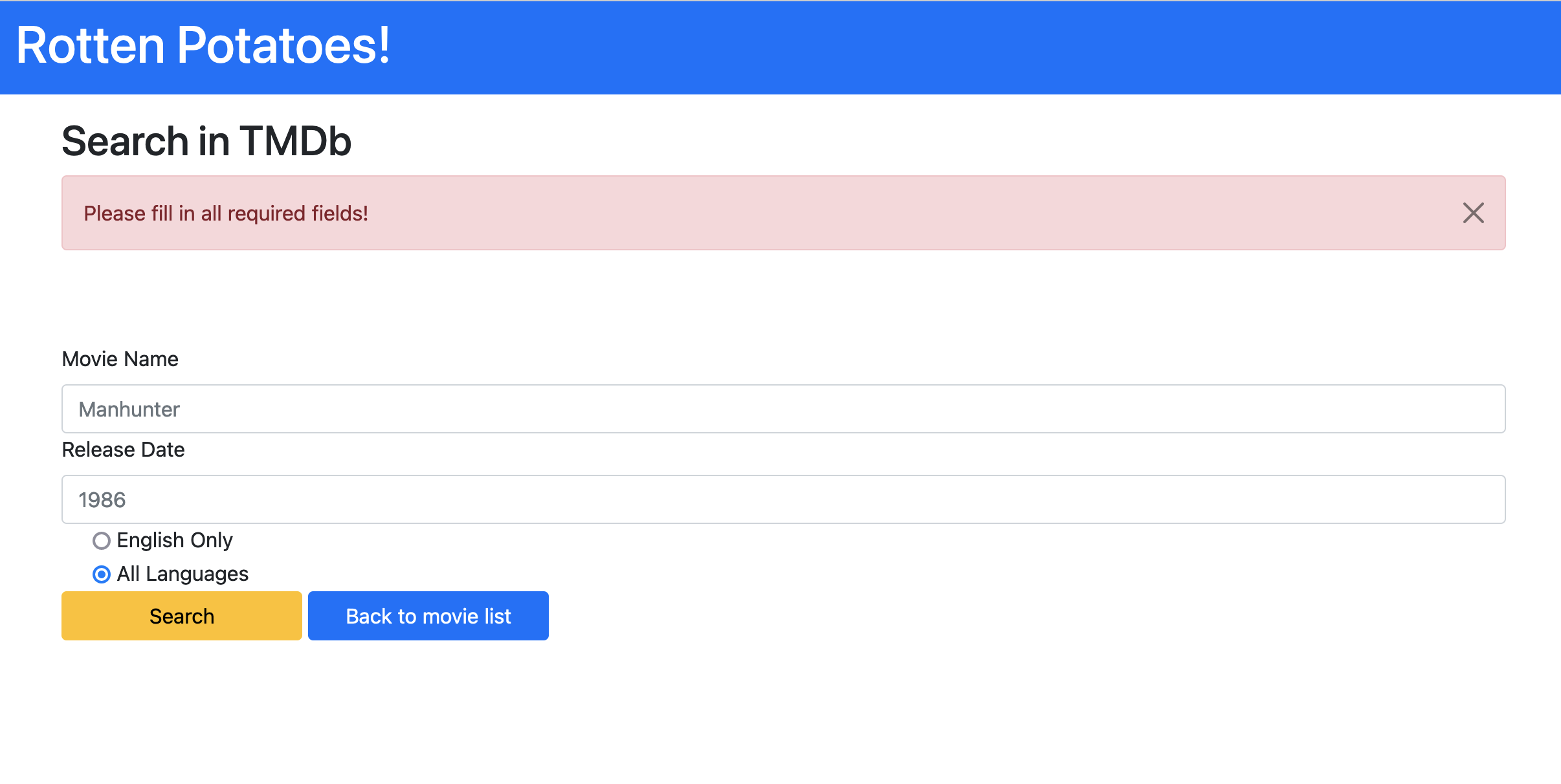
Additionally, if no matching movies are returned, the app should display “No movies found with given parameters!”. As a starting point, copy the code below into the search_tmdb.html.erb; it will make sure that the messages are displayed in the desired style (well, almost, what should the value of key be? you might find bootstrap alerts and colors helpful).
<% flash.each do |key, value| %>
  <div class="alert alert-<%= key %> alert-dismissible fade show" role="alert">
    <%= value %>
    <button type="button" class="btn-close" data-bs-dismiss="alert" aria-label="Close"></button>
  </div>
<% end %>
The find_in_tmdb method should return a list of movies that have NOT been saved to the database. A slight nuance with TMDb API is that it actually does not return a MPAA rating on a query for movie lookups. This would need to be done in a separate API call, so we will not require displaying the correct ratings and you should just put “R” for all of them (to be safe). Curious readers are encourages to try fetching the correct ratings, but this will not be tested in the autograder (you may need to lookup how ratings are stored as numbers in TMDb).
Stubbing API calls
Back to spec! Unfortunately, the spec we have written so far will actually call the real TMDb service every time it is executed, making the spec neither Fast (each call takes a few seconds to complete) nor Repeatable (the test will behave differently if TMDb is down or your computer is not connected to the Internet). Even if you only ran tests while connected to the Internet, it is very bad etiquette to have your tests constantly contacting a production service.
We can fix this by introducing a seam that isolates the caller from the callee. Once again we stand on the shoulders of others. WebMock is stubbing library which we will use to stub our requests to the TMDb. Include the following line in the test group of Gemfile and run bundle install.
gem "webmock", '2.3.2'
Then, we will need to include this library in spec/spec_helper.rb. Add the code below to the top of that file.
require 'webmock/rspec'
WebMock.disable_net_connect!(allow_localhost: true)
The first line requires the installed gem, and the second line disables any web requests. After you have done this, make sure to include spec_helper.rb in the movie spec by calling require 'spec_helper'. What happens when we run models tests now? You may need to update the one test we included earlier; although we are expecting Faraday to be called, the exact parameter is not important for this initial test (which is just making sure that Faraday is receiving some call). Update the find_in_tmdb call so that its argument resembles a more realistic argument, then remove the .with call (since it’s not as obvious anymore exactly what URL Faraday will be called with).
Let’s be more explicit now. Add a new test which directly calls Movie.find_in_tmdb.
it 'calls Tmdb with valid API key' do
   Movie.find_in_tmdb({title: "hacker", language: "en"})
end
What happens when you run the spec now? You should get an error message approximately equivalent to something like WebMock::NetConnectNotAllowedError:
Real HTTP connections are disabled. Yay, we are successfully blocking real HTTP requests in the spec, but how do we actually get data from the TMDb now? We don’t, that is the entire point of stubbing an external call. Instead we will use a predefined response body which will be accessible for all tests in the movie spec. In spec_helper.rb go ahead and add the following block.
RSpec.configure do |config|
  json_return = {"page":1,"results":[{"adult":false,"backdrop_path":"/kqMV9VUrGv9BbmRTOzXKyIraeOG.jpg","genre_ids":[],"id":716088,"original_language":"en","original_title":"Sydney 2000 Olympics Opening Ceremony","overview":"Coverage of the glorious Olympic Opening Ceremony of the Games in Sydney. The opening ceremony of the 2000 Summer Olympic games took place on Friday 15 September in Stadium Australia. As mandated by the Olympic Charter, the proceedings combined the formal and ceremonial opening of this international sporting event, including welcoming speeches, hoisting of the flags and the parade of athletes, with an artistic spectacle to showcase the host nation's culture and history.","popularity":3.733,"poster_path":"/nE9GGznpsYPuRIg3kCBgsfCwC2j.jpg","release_date":"2000-09-15","title":"Sydney 2000 Olympics Opening Ceremony","video":false,"vote_average":7.3,"vote_count":3},{"adult":false,"backdrop_path":"/7MMlToGu6JBVtL7myvNQIq0qtIf.jpg","genre_ids":[],"id":716098,"original_language":"en","original_title":"Sydney 2000 Olympics Closing Ceremony","overview":"The 2000 Summer Olympics Closing Ceremony took place on 1 October 2000 in Stadium Australia. The Closing Ceremony attracted 114,714 people, the largest attendance in modern Olympic Games history. IOC President Juan Antonio Samaranch declared that the 2000 Olympic games were best Olympic Games ever.","popularity":1.308,"poster_path":"/jSxterIFJPP5CDZ4Jderik25hxT.jpg","release_date":"2000-10-01","title":"Sydney 2000 Olympics Closing Ceremony","video":false,"vote_average":10,"vote_count":1}],"total_pages":1,"total_results":2}

  config.before(:each) do
    stub_request(:get, /api.themoviedb.org/).
      with(headers: {'Accept'=>'*/*', 'User-Agent'=>'Faraday v1.8.0'}).
      to_return(status: 200, body: JSON.generate(json_return), headers: {})
  end
end
Now, all tests should be green, because we have successfully stubbed the web with a fake response. The response we provide is actually the response of querying “Olympics” with a release year set to “2000”. Surprisingly, only two entries showed up when queried with TMDb.
OK, what’s next? There are a number of things that we haven’t tested yet. For example how would you check if the API key is valid, or how would you handle the case if there are no matching movies? One possible choice would be to stub these types of requests as well, just the way we did in spec_helper.rb for a generic response!
Adding search results to the view
As a final step we need to display all the returned movies in a table, much like we did in the home page in prior CHIPS. Following a similar schematic as in the index.html.erb view, create a table where all the query results will go. The table you create should have and id set to search_movies. Note: when do we actually want to display this table (should the table still be displayed if an error occurs?).
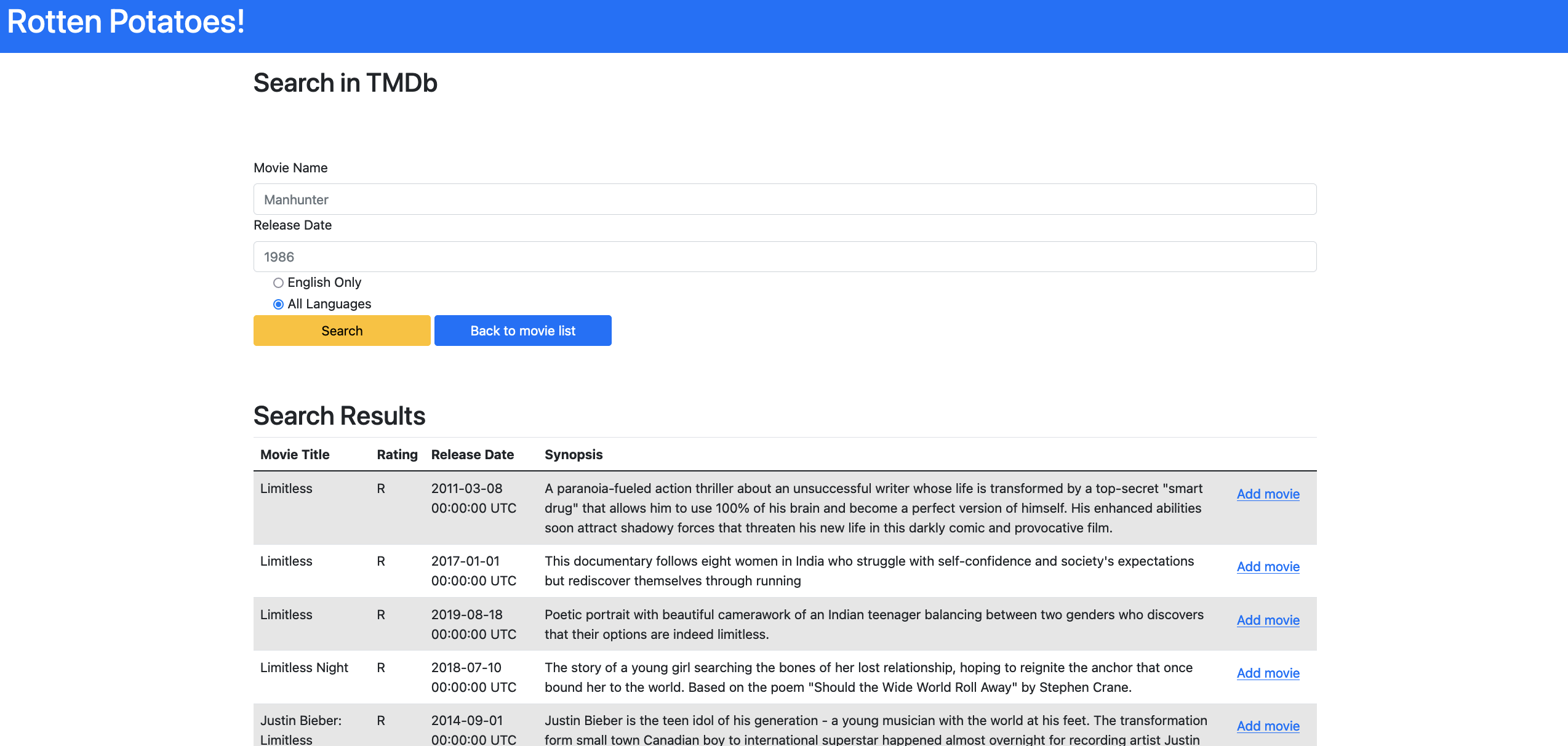
Additionally, we want to have a button for each entry of the resulting movies so that the user can add these movies to their RottenPotatoes database. Since this button will modify the internal database, what type of an HTTP request should it resemble?
Recall that the view interacts with controller through forms, you will need to include a form for the last column of the table. The form should contain all the fields necessary to make a movie (i.e. title, release_date, etc.).
Hint: To add input elements without displaying them on the view, consider using hidden_field_tag.
Since this Add movie button makes a [redacted] request, you will need to create a route and a controller action for it. Name these add_movie, and make sure to write tests as we did with search_tmdb, it will pay off later on!
In the controller method, save the movie object with the specified parameters to the database, and after, redirect to /search with the message “movie_name was successfully added to RottenPotatoes.”
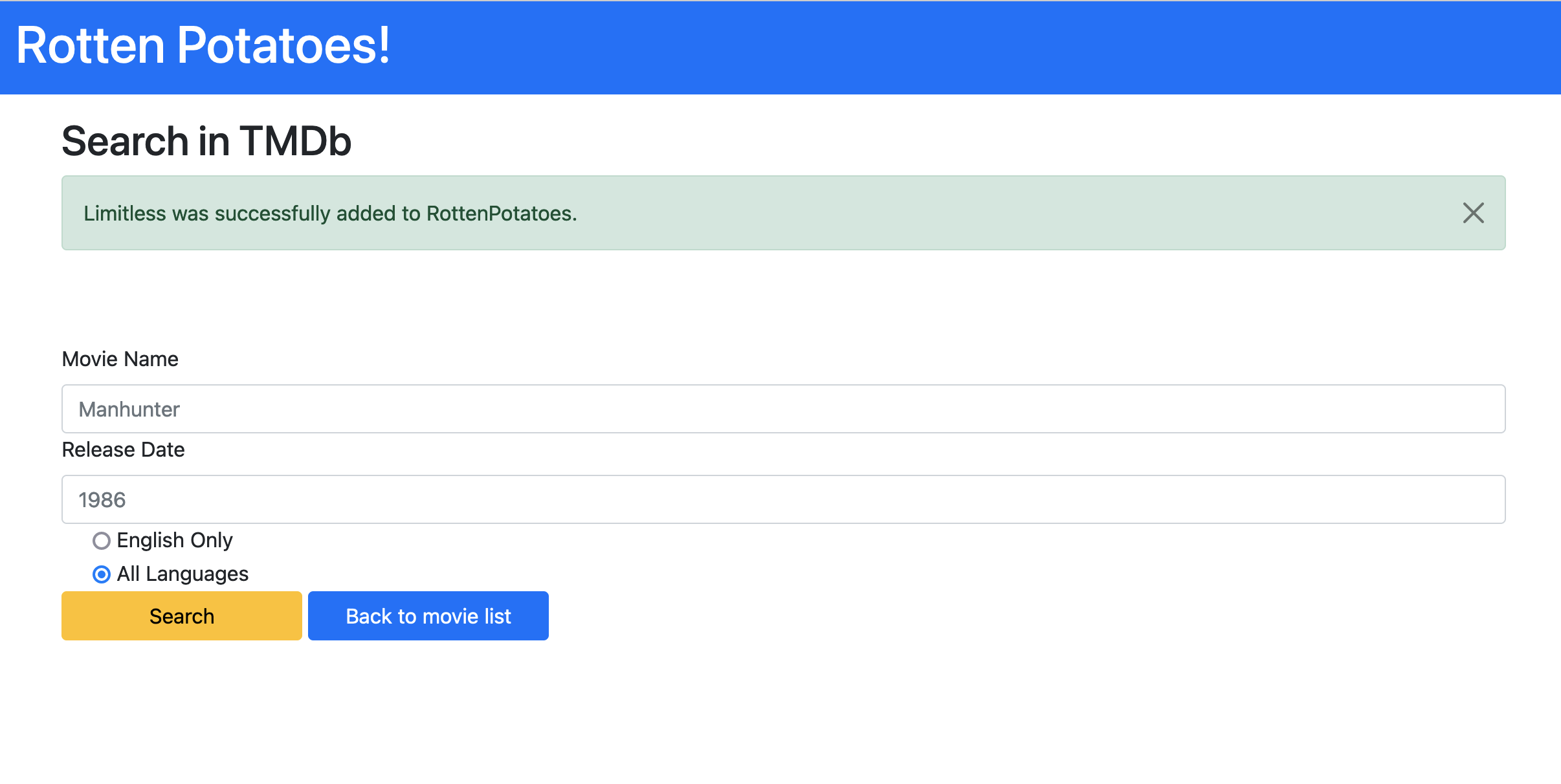
Navigate back to the home page and make sure the movie added appears in the list of displayed movies.
Would the newly added movie still be displayed if we left rating field empty when creating these movie objects for the first time in Movie.find_in_tmdb?
No, since we filter out movies in the index method of the controller. Movies with no matching ratings will not be rendered from the SQL query.
And voila, RottenPotatoes can now call TMDb API and dynamically add movies to the database.
Your turn to test
So far we walked through writing RSpec tests together, but eventually you will have to start writing your own. Testing is essential part of Agile, and following patterns like Red-Green-Refactor will only benefit you in the long run. In the next part you will deploy the new version of RottenPotatoes to Heroku and then submit to autograder. Unlike previous CHIPS, we will only expose a subset of the tests that you fail. To get full points you will most likely need to write your own tests.