1. Run the App
NOTE: You may find the Rails guides and the Rails API reference helpful to have on hand.
Like substantially all Rails apps, you can get this one running by doing these steps:
- Get your own copy of the assignment repo: fork it on GitHub, then clone your fork (or open your fork in GitHub Codespaces). Don’t work directly in the class copy, since you will be submitting this app.
git clone https://github.com/<your-github-username>/hw-rails-wordguesser.git
- Change into the app’s root directory
hw-rails-wordguesser
- Install the gems the app depends on, telling Bundler to leave out the
productiongroup (this is the current spelling of the olderbundle install --without production):
bundle config set --local without production
bundle install
- Start the server:
| Local computer | Docker, Codespaces, or Codio |
|---|---|
bin/rails server |
bin/rails server -b 0.0.0.0 |
The -b 0.0.0.0 in the right-hand column matters whenever the app runs somewhere other than your own machine. By default the app server only accepts connections from the machine it is running on, so a container would refuse the request your browser makes from outside it. 0.0.0.0 tells it to accept connections on every network interface.
- See the app in your browser:
| Local computer | Docker, Codespaces, or Codio |
|---|---|
Open a fresh browser tab and visit localhost:3000. |
Your app is running inside a container or on a remote machine, so you reach it through a forwarded port rather than directly. Docker: start the container with -p 3000:3000, then visit localhost:3000 in your own browser. Codespaces: the port is forwarded for you as soon as the server starts, and a notification offers to open it. If you dismissed that notification, open the Ports panel, find port 3000, and click the globe icon to open it in your browser. If port 3000 isn’t listed at all, click Forward a Port and enter 3000. Codio: click the “Box URL” button on the top toolbar, which is pre-configured to point at port 3000. Set it to open in a new browser tab rather than a Codio tab, as the latter doesn’t always work. 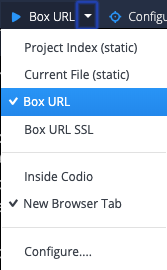 |
If you are setting up Docker or Codespaces for the first time, DEVELOPING.md in the repo walks through each option.
Self Check Questions
Q1.1. What is the goal of running bundle install?
Q1.2. Why is it good practice to leave out the production group (bundle config set --local without production) when installing the gems on your development computer?
Q1.3. (For most Rails apps you’d also have to create and seed the development database, but like the Sinatra app, this app doesn’t use a database at all.)
Play around with the game to convince yourself it works the same as the Sinatra version.